Building a trustworthy accredited-employer checker for New Zealand job seekers
When a job seeker sees an employer on LinkedIn or SEEK, one practical question can matter a great deal: is the employer accredited by Immigration New Zealand (INZ)?
At first glance, the product sounds straightforward. Read the company name from the page, search an official list, and show a badge.
That would be easy to build, but it would not be trustworthy.
The company name on a job platform may be a brand, a trading name, an advertiser name, or a legal entity name. The official accredited-employer data may use a different name. A result may be old. Two legal employers may share a similar name. And a failed lookup does not prove that an employer is unaccredited.
I built NZ Accredited Employer Inspector around that harder problem: helping job seekers check accreditation while being honest about what the system knows, where each fact came from, and where it is uncertain.
The result is an open-source Chrome extension for LinkedIn and SEEK NZ, backed by a canonical employer dataset, interactive insights, a public API, and dated Open Data snapshots. This post explains the product and engineering decisions behind it.
The problem is not search; it is identity and trust
INZ is authoritative for accreditation information such as a legal employer name, NZBN, trading name, and accreditation expiry. But INZ does not tell us which LinkedIn company page or SEEK advertiser belongs to which legal employer.
Those are separate claims:
- Accreditation claim: a legal employer, identified by NZBN, appears in official INZ data with a stated accreditation expiry.
- Platform identity claim: the public LinkedIn or SEEK page currently being viewed corresponds to that legal employer.
Conflating these claims would make the UI look simpler while making the product less honest. A green “accredited” label on a company page is only meaningful when the product can explain both the official record and how the page was connected to it.
That distinction became the central design principle: preserve the provenance of every result instead of collapsing everything into a single isAccredited boolean.
A small product with real consequences
This is not an immigration advice service, and it cannot determine whether a particular job or person meets visa requirements. It is an independent tool that helps users inspect one useful piece of public information in context.
Even within that boundary, a careless implementation could cause harm:
- a weak name match could associate the wrong company with an accredited legal entity;
- stale data could be presented as current fact;
- an empty search response could be worded as proof of non-accreditation;
- automatic queries on every page view could create avoidable load and ignore user intent; or
- internal platform and community data could leak through a public interface.
Trust here does not mean claiming perfect certainty. It means making conservative decisions, exposing meaningful context, and declining to automate when the evidence is not strong enough.
The product experience: check in context, on the user’s terms
The extension runs on supported LinkedIn and SEEK NZ company and job pages. It identifies the public company or advertiser context and renders a small widget, but it does not run a lookup when the page loads.
The user explicitly selects Check NZ accreditation. That action may perform at most one live INZ request.
This constraint is deliberate. It makes the product more respectful of user intent, avoids turning ordinary browsing into background collection, limits unnecessary traffic to an external service, and makes the live-query path easy to reason about. It also creates a clean performance boundary: rendering a page widget and verifying a public record are different operations.
When the product has enough evidence, it shows the selected employer, NZBN, accreditation expiry, verification date, and the reason the result was selected. When it does not have enough evidence, it presents candidate employers and asks the user to choose rather than pretending that fuzzy matching is certainty.
The canonical asset is an employer record, not a search cache
The core of the system is a canonical, NZBN-keyed employers dataset. One record represents one legal employer and the latest accepted official accreditation observation.
The dataset is supplied through two official channels:
- validated bulk snapshots from an MBIE Official Information Act release; and
- live results returned by INZ after a user-triggered extension check.
The bulk importer validates the expected spreadsheet layout, snapshot date, row count, field formats, and duplicate NZBNs before updating canonical records. It stages a complete import before activation, so a partial upload cannot partially overwrite the live dataset. A newer live observation is also protected from being overwritten by an older bulk snapshot.
This is a fairly ordinary data-engineering discipline, but it matters. A data product should make it difficult for an operator mistake or incomplete source file to quietly downgrade a previously accepted record.
The product stores lastVerifiedAt separately from the official accreditation expiry. The former is the time my service accepted an official observation; it is not an INZ-supplied fact. Keeping those meanings separate helps the UI and API describe freshness accurately.
Three kinds of matching evidence
The difficult part is mapping a platform page to the canonical employer record. The system distinguishes three types of evidence instead of treating them as interchangeable.
| Evidence | Source | What it means |
|---|---|---|
| Official employer record | INZ / validated MBIE snapshot | A legal employer, NZBN, trading name, and accreditation expiry are published official data. |
| Exact-name match | Worker-derived | One official or trading name exactly equals the platform display name after narrow normalisation. |
| Community association | Extension users | Users selected an NZBN for a specific public LinkedIn or SEEK identity. |
An exact-name match is intentionally narrow. The service applies Unicode normalisation, trims and collapses whitespace, and compares case-insensitively. It does not remove punctuation, company suffixes, or words until a name merely looks similar. If more than one NZBN has the same matching name, the system does not select one automatically.
Community associations solve a different problem. If users confirm that a particular LinkedIn company slug or SEEK profile belongs to a legal employer, the system can reuse that identity mapping later. But it remains community data, not an INZ fact. It may be disputed, and it must never be presented as official accreditation evidence.
This distinction lets the interface say something useful without overstating confidence: “automatic exact INZ name match” is not the same thing as “community-confirmed association”, and neither is the same thing as an official accreditation record.
The architecture follows the trust boundaries
The implementation uses a Chrome extension, a Cloudflare Worker, D1, and R2. The important part is not the technology list; it is the separation of responsibilities.
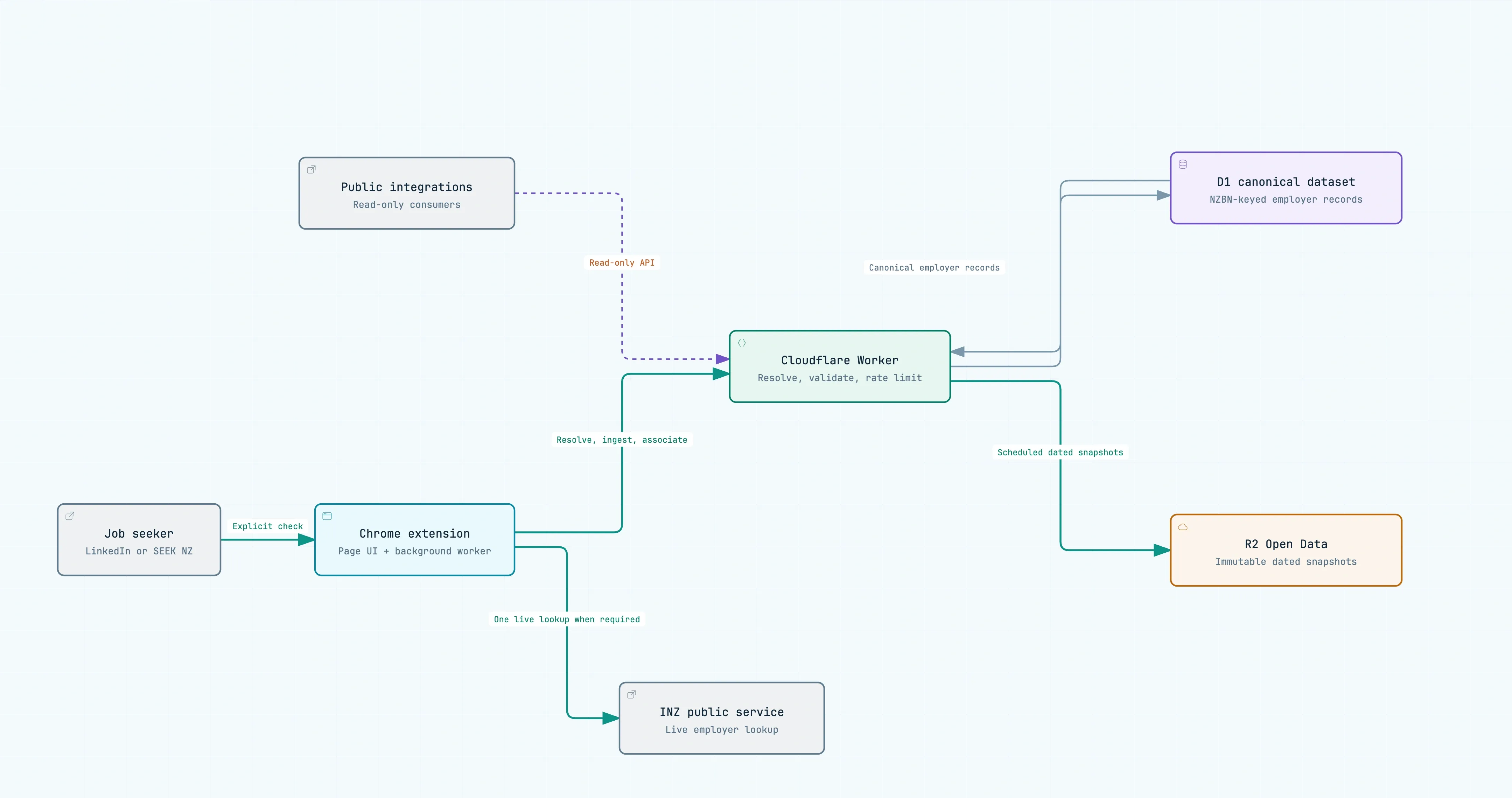
The architecture follows the trust boundaries: live INZ lookups remain in the explicit user-initiated browser flow, while public integrations can read only the canonical employer data.
The content scripts identify the supported page and render the result UI. The extension background service worker owns the installation identifier and orchestration. The Cloudflare Worker validates requests, resolves employers, persists observations, evaluates freshness, and applies rate limits.
One important boundary is that the Worker does not call INZ. When a live lookup is required, the extension makes it only after the user’s explicit action, then submits the validated result to the Worker. This keeps live verification within the user-initiated browser flow rather than turning the backend into a general proxy or bulk lookup service.
The system also supports an operator-run refresh process for records approaching expiry. That process is deliberately outside the extension request path: background maintenance should not make an interactive user action slow, unpredictable, or responsible for all data upkeep.
Freshness is product behaviour, not just a timestamp
Official data changes. Employer accreditations expire, renew, or disappear from a published search result. Treating every stored result as timeless would be misleading.
The system therefore has explicit freshness rules:
- a positive official observation is eligible for refresh after a configured freshness window or once its stored expiry has passed;
- refreshes are coordinated per NZBN so several users do not trigger duplicate live checks at the same time;
- a recognised no-result for a known NZBN applies a short cooldown, while retaining the older dated record as context; and
- a no-match by platform display name is scoped to that exact public identity and normalised query, and expires quickly.
The wording matters as much as the implementation. “No published INZ match” means a particular query returned no published result at a stated time. It does not mean “this employer is not accredited”. The product keeps that distinction visible in the interface and API contract.
Public by design, but not indiscriminate
The project has three public surfaces with different purposes.
The Insights view turns the dated official snapshot into an interactive picture of where accredited employers are based, their sector mix, and scheduled accreditation expiries. It is useful for exploration, while remaining clear that it describes a dated observation rather than a live guarantee.
The read-only Public API supports NZBN lookup and bounded name search for applications that need a small number of records. It intentionally does not expose platform identities, community associations, installation identifiers, refresh controls, or write routes.
For bulk users, the project publishes Open Data snapshots to R2. Each release is a dated, immutable CSV accompanied by metadata, a checksum, and a versioned schema. There is no mutable latest.csv: consumers can identify exactly which dated observation they used, reproduce their import, and compare releases over time.
This separation is useful beyond this project. An interactive exploration surface, an API, and bulk data have different audiences, access patterns, costs, and failure modes. Making one pretend to be another usually produces a worse service for all of them.
What I would like users to take away
For job seekers, the goal is simple: inspect a relevant public record without leaving the company or job page, while seeing enough context to interpret the result responsibly.
For me as an engineer, the project is a reminder that a useful interface sits on top of a much more important question: what exactly does this system know, and why should anyone believe it?
The answer should not be hidden in implementation details. It should shape the data model, the API, the interaction design, the operational workflow, and the words shown to users.
That is the standard I wanted to build toward: not a confident-looking badge, but a small, useful tool that is clear about its evidence and honest about its limits.
Explore the project
- Product site
- Chrome Web Store extension
- How results work
- Insights
- Public API
- Open Data catalog
- Source code
This project is independent open-source software. It is not an INZ or MBIE product and does not provide immigration or legal advice. For consequential decisions, verify the legal employer name and NZBN with the employer and consult the official INZ accredited-employer information.